100 Things You Can Do with Claude Code
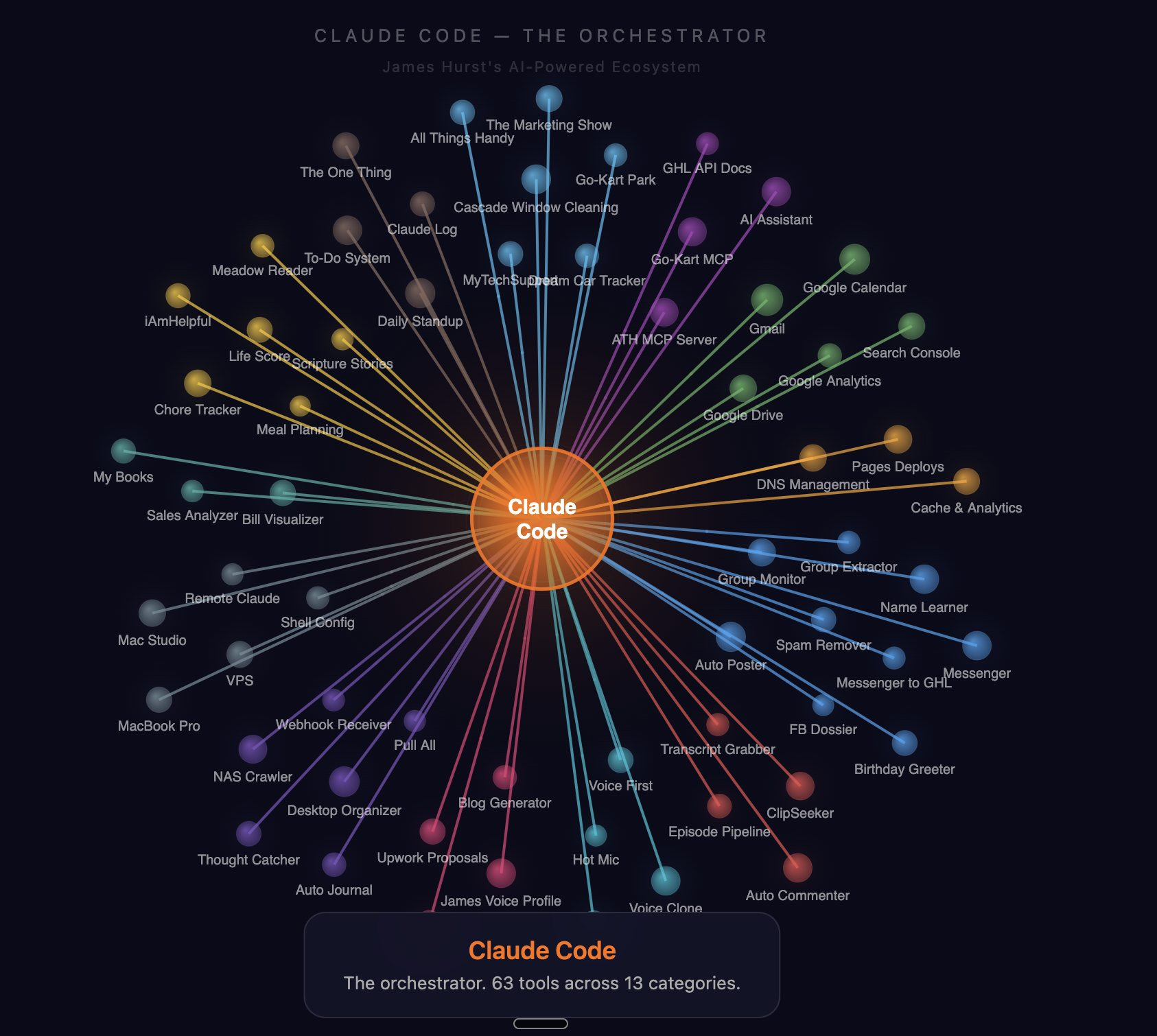
I have been using Claude Code as my primary interface for everything for months now. Not just coding. Everything. Email, CRM, calendar, content, business automation, deployment, financial tracking, voice assistant, personal journal. All of it runs through Claude Code.
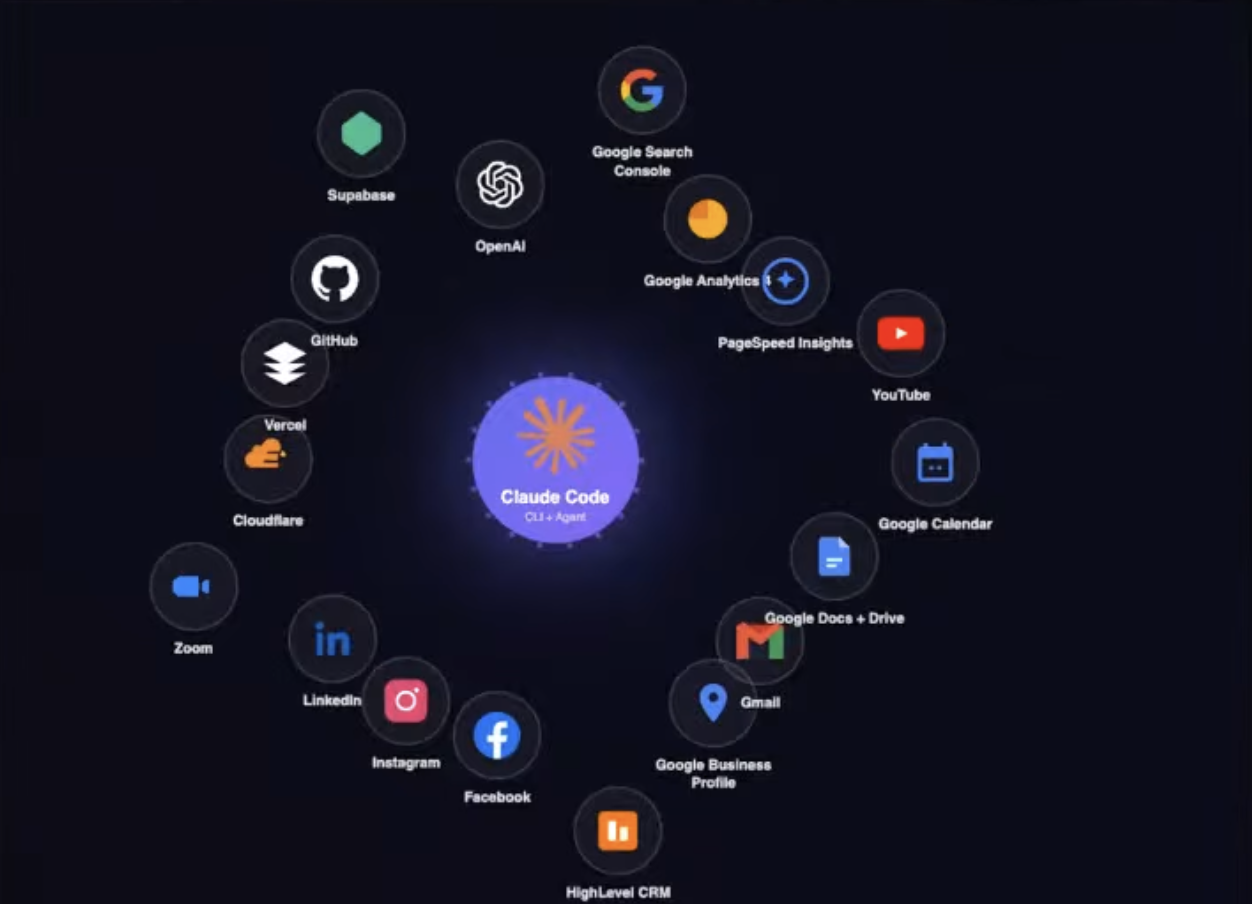
This is not a list of things Claude Code could theoretically do. These are things I actually do with it. Most of them daily.
Build Entire Websites
-
Build a full website from scratch — pick the framework, set up the project, write every page, deploy it. I have built sites in Next.js, Astro, plain HTML, and SwiftUI this way. Not boilerplate. Real production sites with forms, CMS integration, SEO, and analytics.
-
Build a landing page from a description or a screenshot. Show it a competitor page and say "make me something like this but better" and it will.
-
Build an admin dashboard with charts, tables, filters, and CRUD operations. I have a CRM dashboard, a session monitor, an infrastructure health check page, and a to-do list dashboard — all built entirely by Claude Code.
-
Design and implement a blog with Markdown or MDX content, auto-generated OG images, internal linking, and affiliate link management. The site you are reading this on was built this way.
-
Create a responsive, mobile-first design with Tailwind CSS. It handles the theme, the breakpoints, the dark mode toggle, all of it.
Build Apps and Tools
-
Build a Chrome extension from a feature description. I have about a dozen Chrome extensions Claude Code built for me — auto-posting to Facebook groups, transcribing voice notes in Messenger, scoring Facebook group join requests, generating Upwork proposals, and more.
-
Build a native macOS desktop app. I have a personal bookkeeping app in SwiftUI that replaced QuickBooks. Claude Code wrote the whole thing.
-
Build a CLI tool with argument parsing, help text, and colored output. Most of my automation scripts started this way.
-
Build an MCP server that exposes your business data to Claude. I have MCP servers wrapping two different CRM accounts, Gmail, Google Calendar, and Google Search Console. Claude Code built all of them.
-
Build a real-time voice assistant. I have an always-listening browser-based assistant that captures speech, interprets it with AI, and executes actions — opening apps, sending messages, controlling smart devices, bridging to Claude Code. Built entirely by Claude Code.
Write and Ship Code
-
Build an internal wiki for your agency in about 20 minutes. GitHub stores it, Claude Code scaffolds it, Cloudflare hosts it free and gates it with Zero Trust so only your team gets in. Astro Starlight turns the markdown into a real site. Self-documenting because every change is tracked, attributed, and rolled into the live build automatically.
-
Write API endpoints with authentication, validation, rate limiting, and error handling. I have REST APIs, GraphQL resolvers, and webhook receivers all written by Claude Code.
-
Write database migrations, queries, indexes, and seed scripts. It understands your schema and writes SQL that actually works with your data.
-
Write tests — unit, integration, end-to-end, load, snapshot. It reads your code and writes tests that cover the real edge cases, not just the happy path.
-
Refactor an entire codebase. Rename variables across files, extract functions, convert callbacks to async/await, migrate from one library to another, restructure your folder layout. It does it all in one pass.
Debug Anything
-
Paste an error message and get the fix. Not just "this might be the issue" — it reads your actual code, traces the problem, and fixes it. If the fix requires restarting a server or reloading an extension, it does that too.
-
Debug a failing deployment by reading build logs, checking configs, and fixing the issue. I have watched it trace a 500 error through three layers of middleware to find a missing environment variable.
-
Run root cause analysis. Not just "what broke" but "why did we think this was working." It traces the gap in thinking that led to the bug and updates the process so it does not happen again.
Manage Git Like a Pro
-
Handle the full git workflow — stage, commit, push, pull, branch, merge, rebase, cherry-pick, tag. It writes commit messages that explain the "why" not the "what."
-
Create pull requests with proper titles, summaries, and test plans. Review PRs by reading the diff and catching issues.
-
Sync repos across multiple machines. I work on four computers. After every push, Claude Code triggers a sync script that pulls the changes on my other machines. Everything stays in lockstep.
-
Maintain a build number convention across every repo. It bumps the number on every commit and announces it. I always know the exact build of everything.
Deploy and Manage Infrastructure
-
Deploy a website to Cloudflare Pages, Vercel, or a VPS — including DNS setup, SSL, and reverse proxy configuration. One command deploys everything and verifies it is live before telling me.
-
Set up a VPS from scratch — SSH keys, firewall, users, services, process managers, Docker, Caddy as a reverse proxy. I have a production VPS that Claude Code configured entirely.
-
Run a full Cloudflare audit — DNS records, SSL settings, HSTS, DMARC, SPF, domain expiration, stale subdomains. It catches things I would never check manually and emails me a daily report.
-
Self-host services. I migrated from Supabase Cloud to self-hosted Supabase on my VPS. Claude Code handled the export, the Docker setup, the migrations, the DNS, and the data import.
-
Monitor infrastructure health with a 49-point daily check across 15 categories. If something is wrong, it emails me before I notice.
Send Emails
-
Check my inbox, triage emails (trash, archive, flag), draft replies, and send HTML-formatted emails. It has triage rules that learn my patterns over time.
-
Send daily analytics emails with traffic data, CRM summaries, and action items. I get a morning email with everything I need to know about my businesses.
-
Send a journal digest email at the end of the day that weaves together calendar events, git commits, and conversation highlights into a narrative.
Run a CRM
-
Search contacts, view conversation history, read call transcripts, track pipeline stages, and score leads — all through natural language. "Who is my hottest prospect right now?" gets a real answer.
-
Send SMS through the CRM with approval gates. I draft the message, Claude Code shows it to me, I approve, it sends. Never sends without my say-so.
-
Build automated nudge reports that identify stale leads, cold opportunities, and contacts who need follow-up. It tells me who to call and why.
-
Create contacts from external data sources — Facebook Messenger conversations, group join requests, lead forms, scraping tools. Data flows into the CRM without me touching a form.
Manage SEO
-
Query Google Search Console for search performance across all my sites. Clicks, impressions, CTR, position — broken down by query and page.
-
Run a multi-site SEO health audit. It finds CTR opportunities (pages getting impressions but not clicks), content gaps, and indexing issues. Then it fixes them.
-
Submit sitemaps, request URL indexing, and inspect specific URLs for indexing status. Automated daily on a cron job.
-
Run PageSpeed Insights audits and fix the performance issues it finds. Iterative — it audits, fixes, re-audits until the scores are where I want them.
Post to Social Media
-
Post text and images to Facebook groups, Facebook personal page, LinkedIn, and Instagram — all from one command. It writes the copy, attaches the image, and posts to every platform.
-
Create a Facebook comment ladder post — a value post with engagement-driving follow-up comments, formatted and timed for the algorithm.
-
Scan Facebook groups for business leads. A Python script scrolls the feed, extracts posts, and Claude scores each one for fit. Only surfaces real opportunities where someone is asking for help, not self-promo.
-
Track Facebook follower growth with daily metrics, trend charts, and email reports.
Create Content
-
Transform a video transcript into a full blog post. Not a summary — a real article that pulls the best insights, adds structure, and sounds like I wrote it. Because I did talk it, Claude just organized it.
-
Generate social media posts for multiple platforms from one piece of content. Different tone for LinkedIn vs Facebook, proper hashtags, platform-specific formatting.
-
Write Upwork proposals tailored to each job posting. It reads the listing, finds hidden signals (client name, location, test words), and writes a proposal in my voice with my real credentials. Never fabricates experience.
-
Build a content index that scans all my published work — video transcripts, blog posts, articles — and makes it searchable. When I write new content, it knows what I have already covered.
Manage My Calendar
-
Check my calendar and tell me what is coming up. Skip what is past, show what is next, announce it out loud. I hear my schedule every morning.
-
Set calendar reminders that speak out loud at 30, 15, and 3 minutes before every event. Plus routine reminders hourly and to-do reminders every 15 minutes.
-
Build a personalized daily briefing — date, weather, calendar, routines, and to-do list. One command and I know exactly what my day looks like.
Talk to Me
-
Read every response out loud using text-to-speech. I use voice input (Wispr Flow) and Claude speaks back. It is a full voice-first workflow — I rarely type.
-
Handle pronunciation corrections. If it mispronounces a name or technical term, I tell it once and it remembers forever by updating a pronunciation dictionary in the speech script.
Our Toolbox. Every platform, plugin, and service we use and recommend, in one place. See the list →
-
Clone my voice. I have an ElevenLabs voice clone trained on my own recordings. Claude Code built the training pipeline, the API integration, and the apps that use it.
-
Enforce voice and screen congruency with a hook. Whatever Claude writes on screen is word-for-word what it says out loud. A Python hook intercepts every speech call and blocks it if the text drifts from what is on screen. No paraphrasing. No summarizing.
Automate Everything with Hooks
-
Run a script before every tool call. I use PreToolUse hooks to enforce guardrails — block accidental sends, redirect raw API calls to MCP tools, check build numbers, enforce clipboard loading before opening URLs, and more.
-
Run a script after every tool call. PostToolUse hooks auto-sync changes to other machines after git push, update VS Code workspace titles, and write nudge reminders when Claude is waiting on me.
-
Auto-log every conversation turn to a daily markdown file and auto-commit it every 5 minutes. My entire interaction history is version-controlled and searchable.
-
Block dangerous operations with confirmation gates. Invoice sends, appointment bookings, outbound messages — all blocked until explicit confirmation flags exist. Code enforces this, not LLM memory.
-
Detect family time and bedtime. Hooks check the clock and gently remind me when it is time to stop working. Different messages for evenings vs late night.
-
Monitor context window size and warn at escalating thresholds. Yellow at 3 MB, orange at 5 MB, red at 8 MB. I know when to clear and start fresh.
Run Multi-Machine Workflows
-
Sync code across four machines — MacBook Pro, Mac Studio, VPS, and Remote Mac. Push on one, auto-pull on the others. Every machine has every repo. All of it rides on Tailscale, the free mesh VPN that puts every machine on one network whether I am at home or on the road.
-
Run browser automations on a dedicated remote machine via SSH. Chrome extensions, social media posting, data scraping — all on the Remote Mac so my main machines stay clean.
-
Run headless Chrome on a VPS with Xvfb and noVNC. I can watch it work through a browser-based VNC viewer.
-
Check for uncommitted work on the VPS before closing out. It SSHes in, scans for dirty repos, and reports what needs committing. Nothing gets left behind.
-
Run a daily update recon that SSHes into every machine and checks for system updates — brew, apt, git repos behind origin. Compiles an email with everything across all machines.
Use the Claude Code CLI for Everything
-
Pipe text through Claude for processing using claude -p. No API costs — it runs on the Max subscription. I use this for comment classification, lead scoring, email generation, recipe scraping, content analysis, pronunciation fixing, and root cause analysis.
-
Get structured JSON output with --json-schema. Feed it job listings, get back scored and categorized leads in a structured format your code can consume.
-
Build entire automation pipelines where Python does the data gathering and Claude does the thinking. The deterministic + judgment architecture. Scripts fetch the data, claude -p applies intelligence, scripts format the output.
Manage My Personal Life
-
Build a daily journal from calendar events, git commits, and conversation. It asks me about the day — emotions, highlights, non-screen moments — and weaves it into a narrative. First person. Not a log. A story.
-
Process a thought-catcher inbox. I dictate ideas, tasks, and reminders from my phone into Apple Notes. Claude Code picks them up, categorizes them, and routes them to the right place — to-do list, project notes, calendar, or CRM.
-
Set "The One Thing" — my most important task for the day. It tracks it, reminds me, and asks me if I finished it.
-
Manage a tiered to-do list with inbox processing and Google Drive sync. Tasks have priorities, contexts, and due dates. Claude reads them back to me when I ask "what should I work on."
-
Organize loose files in Google Drive into a PARA folder structure (Projects, Areas, Resources, Archive). One file at a time, conversational. It proposes the destination, I approve or redirect.
Run Business Operations
-
Build an entire business website with service pages, location pages, testimonials, FAQs, and lead forms that submit directly to a CRM. I have done this for a handyman business and a go-kart park.
-
Process job uploads — a handyman takes a photo, it goes through AI analysis, and the content gets distributed to the website, Google Business Profile, and social media. Automated pipeline.
-
Build a birthday marketing system. It scans CRM contacts for kids with upcoming birthdays, sorts by nearest date, and helps the business send party offers at the right time.
-
Create invoices and send them via email or SMS through the CRM API. Draft the invoice, preview it, approve it, send it.
-
Track personal finances. My bookkeeping app (built by Claude Code) imports bank transactions, detects duplicates, categorizes spending, and generates profit and loss statements. Replaced QuickBooks.
Build the System That Builds the System
-
Write the hooks that enforce its own behavior. Claude Code writes PreToolUse hooks that prevent itself from making mistakes on the next call. The system improves itself.
-
Create skills (slash commands) that chain complex workflows into one command. /closeout journals, saves context, commits, and pushes — everything to wrap up a session. /standup pulls all repos, checks yesterday's context, and briefs me on where we left off.
-
Build a mission control dashboard that shows all active Claude Code sessions across all machines. One HTML page tells me what every session is working on.
-
Build a voice profile by analyzing my own YouTube transcripts — 14 videos, 50,000+ words. Now every AI system that writes as me references this profile. Claude Code did the analysis, wrote the profile, and maintains it.
-
Run a daily reflection on the VPS at 6 AM that analyzes the previous day's conversation logs and emails me findings — SOP drift, missed automations, capability gaps, things that should be hooks but are still promises.
Manage YouTube
-
Upload videos, set metadata (title, description, tags, thumbnails), manage privacy settings, and set videos to public through the YouTube API.
-
Pull transcripts from any YouTube video for content repurposing. The transcript becomes a blog post, social posts, quote graphics, or a voice profile update.
-
Classify and respond to YouTube comments. A script pulls comments, Claude classifies them (auto-reply, human review, or log), and drafts appropriate responses.
-
Sweep for unlisted videos. Every time Claude Code touches the YouTube API, it checks the last 20 uploads for videos stuck on unlisted. Catches the ones I forgot to publish.
Handle DNS and Domains
-
Manage Cloudflare DNS records — add, edit, delete. Set up subdomains, configure proxying, manage page rules.
-
Audit all my domains for stale records, missing security settings, and expiration dates. I own domains across multiple registrars and Claude Code checks all of them.
-
Set up email authentication (SPF, DMARC, DKIM) on every domain. Even domains that do not send mail get hardened against spoofing.
-
Monitor DMARC reports. I have a self-hosted SMTP server that catches DMARC reports, parses the XML, stores it in SQLite, and feeds the data into my SEO audits.
Work with Documents
-
Read and edit Google Docs through the API. Export to plain text, make changes, update the doc. Works with the brand account and shared permissions.
-
Parse PDFs, images, and screenshots. Vision AI reads what is on screen and extracts structured data. Desktop files get analyzed and auto-sorted into the right folder. On the way out, it can also blur PII out of any screenshot before I paste it into a blog post, a support ticket, or a social post — OCR finds the text, Gaussian blur covers just those pixels, tool persists for next time.
-
Manage Apple Notes as an inbox. Dictated thoughts from my phone get picked up, processed, and routed to the right system.
Protect Against My Own Mistakes
-
Block accidental sends with confirmation gates. Invoices, SMS messages, appointment bookings — all blocked by hooks until I explicitly confirm. I cannot accidentally send a message to a customer.
-
Require plan approval before executing complex changes. Claude Code enters plan mode, presents the plan, and waits for my approval before touching anything.
-
Save checkpoints after every substantive exchange. If my session crashes, the next one picks up exactly where I left off. Last session context, structured checkpoints, conversation logs — triple redundancy. Worth knowing that the raw session files are already on disk underneath all of that. And a small Mac app makes every one of them searchable.
-
Block dangerous git operations. The build bump guard blocks commits if the build number was not incremented. The post-push sync ensures every machine stays current.
Learn and Research
-
Explain any codebase by reading it and summarizing the architecture, key files, and patterns. I point it at a new repo and it tells me how everything fits together.
-
Research a technology by reading documentation, comparing options, and recommending an approach. Not generic advice — recommendations based on my specific stack, constraints, and preferences.
-
Write a blog post about 100 things you can do with Claude Code while using Claude Code to do it.
That is 100. And honestly, each one of these has 5-10 sub-capabilities I did not even list. The point is not the number. The point is that Claude Code is not a chatbot that writes code. It is an operating system for your entire workflow.
If you are only using it to write functions and fix bugs, you are leaving 90% of it on the table.
See Also
We are an independent affiliate of Claude Code and may earn a commission if you sign up through links on this page. We are not employees or representatives of Claude Code.
We are an independent affiliate of Hostinger and may earn a commission if you sign up through links on this page. We are not employees or representatives of Hostinger.
We are an independent affiliate of Wispr Flow and may earn a commission if you sign up through links on this page. We are not employees or representatives of Wispr Flow.
Some links in this article are affiliate links. If you purchase through them, we may earn a commission at no extra cost to you. This helps support our content.
This article blends original content, AI-assisted drafting, and human oversight. How I write.
Stay Updated
Get notified when new content is published.
No spam. Unsubscribe anytime.